
Accuracy update — October 19, 2026: Description limits, keyword repetition, and tag guidance have been corrected below. The original examples and screenshots are retained as historical context; interfaces may look different today.
Here are some strategies on how to SEO YouTube videos.
Ultimately the best way to get views is to have high quality AND engaging content. Focus on answering the viewer’s question clearly and keeping the video useful and engaging. No metadata formula guarantees views or rankings.
That being said, here are some simple SEO strategies to help get your videos found in YouTube’s search engine…
—-
Identify your main keyword:
Start with – www.AnswerThePublic.com
Answer the public is an awesome tool where you can type in any subject and it will produce a list of the most commonly asked questions around that topic. Use these questions as your long tail keyword.
For example, it your creating content around “Cash Buyers For Real Estate”, you could find the most commonly asked question and use it as your main video keyword, like “How To Find Cash Buyers For Real Estate”
Use Answer the public to find 3-5 good questions, then go to…
– Google Search “Related Results”
You can do this by typing in the 3-5 questions above and seeing what pops up in the google “Related Results” section at the bottom of every google search page, pic below:
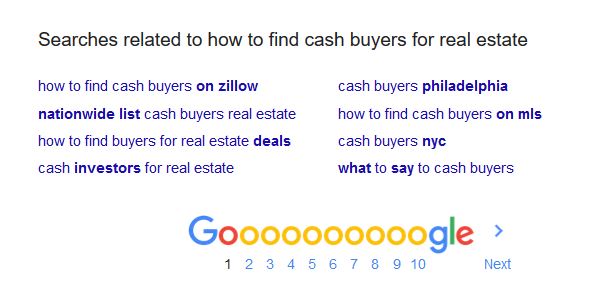
As you can see, more ideas will pop up… and these are good ideas becasue they are displaying what other people are searching for related to your main keyword.
Use this to create another few keyword ideas, then go to…
– Google Keyword Tool
You can use the keyword tool to enter your long tail keyword phrase ideas from Answer The Public and Google Related Search Results, then use the keyword tool to compare estimated Google search demand. Its competition column measures advertiser competition, not organic or YouTube ranking difficulty; Google explains these metrics here. See the example below:
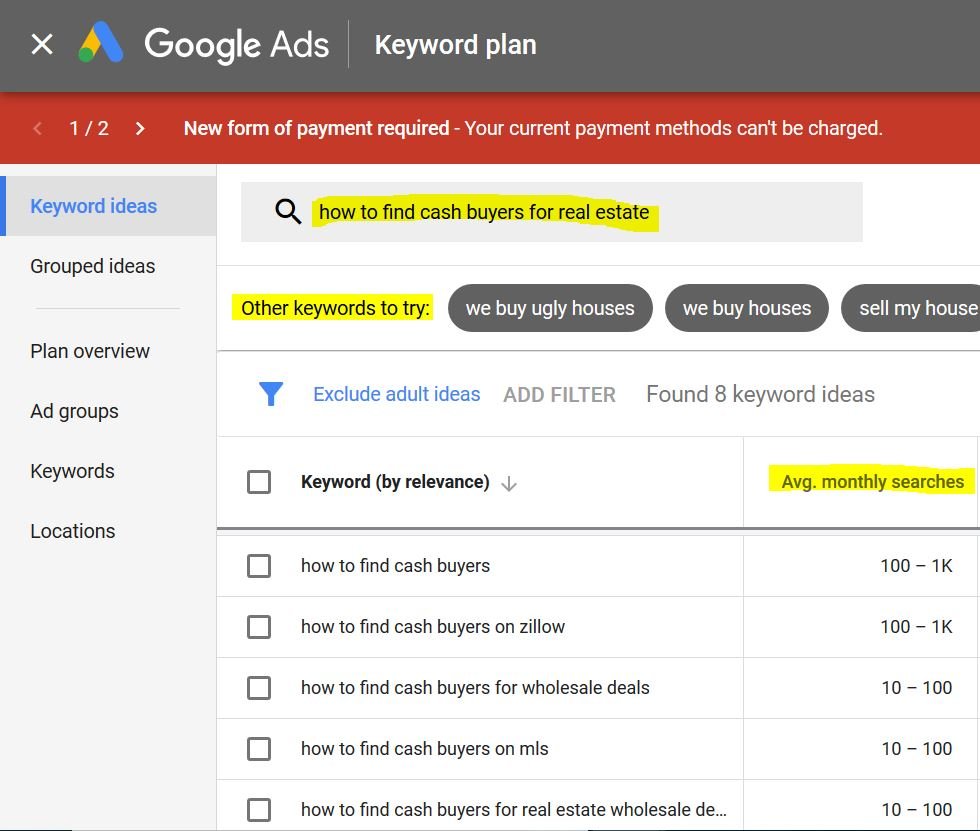
The goal is to enter your list of 5-10 main keyword ideas and then find the ones that get the most searches.
Usually when you do this process 1 or 2 will rise to the top as most searched, then you can pick the one that sounds best or fits best with your particular video.
Make sure you also save your full list of keyword ideas because we’ll use them later in the description and keywords.
—
Video Title:
Once you’ve identified your main keyword, make sure you make that the main focus of your title.
Use a clear, accurate title that includes the main topic naturally; there is no required five-word minimum for this workflow.
So if you were trying to rank for “How To Buy Your First House” you’d want a title like: “Real Estate Tutorial: How to Buy Your First House” or “How To Buy Your First House, Lessons From The Pros” or “Realtor Reveals Secrets On How To Buy Your First House”
It should also read well. The goal is to create a very clickable headline that includes your main keyword.
—
Video Description:
Write a unique description that accurately summarizes the video. YouTube’s official guidance allows up to 5,000 characters, not 3,500 words. Explain the topic in the first few lines and use one or two main topic phrases naturally in the title and description. Add relevant chapters, resources, or related videos when they help the viewer. There is no need to fill the character limit, repeat a phrase five to ten times, or add a fixed number of links. Avoid lists of unrelated keywords and forced repetition.
—
Video Tags:
Here’s how to tag the videos…
– 1st tag exact main keyword (Example: “How To Find Cash Buyers For Real Estate”)
– Then include a few variations of that word or phrase from your initial keyword research (Example: “How to find cash buyers” and “How To Get Cash Buyers For Real Estate”)
– Then, make a few of tags other topics that my video covers (Example: “Attracting Cash Buyers”, “Find People Buying Real Estate With Cash”, “Find Cash Investors”)
– Finally, add the standard tags that will go on every video like “[Your Name]” “[Your Company Name]” “[The Name Of Your Show / Channel]” etc
Use only relevant tags. YouTube says tags play a minimal role in discovery except when terms are commonly misspelled; titles, thumbnails, and descriptions matter more. Do not add excessive tags to the description.
—
Video Thumbnail:
When you create your video thumbnail you want to save it as your main keyword before uploading.
So in the example above you would save the thumbnail as “How To Find Cash Buyers For Real Estate”
—
Hope this quick YouTube SEO guide helps you get more eyeballs on your videos!
If you have any questions on “How To SEO YouTube Videos”, contact me here.
Find me on YouTube here.